 Slides























How to align and distribute objects in Google Slides
Align and evenly distribute objects in Google Slides with the Arrange menu, and see how the Auto Layout & Grid add-on does it in one click with exact gaps.
Read article →

Stop nudging shapes pixel by pixel. Auto Layout & Grid brings real alignment, even spacing, one-click arranging and grid layouts to Google Slides: the layout tools you wish were built in.
Trusted by individuals from these teams
01
Left, center, right, top, middle, bottom. Align any selection to each other or to the slide, the way alignment should actually work.
02
Distribute objects with equal horizontal or vertical gaps. No more eyeballing 12px here and 9px there.
03
Stack objects into a clean row or column with a fixed gap, anchored exactly where you want. Like auto-layout, for slides.
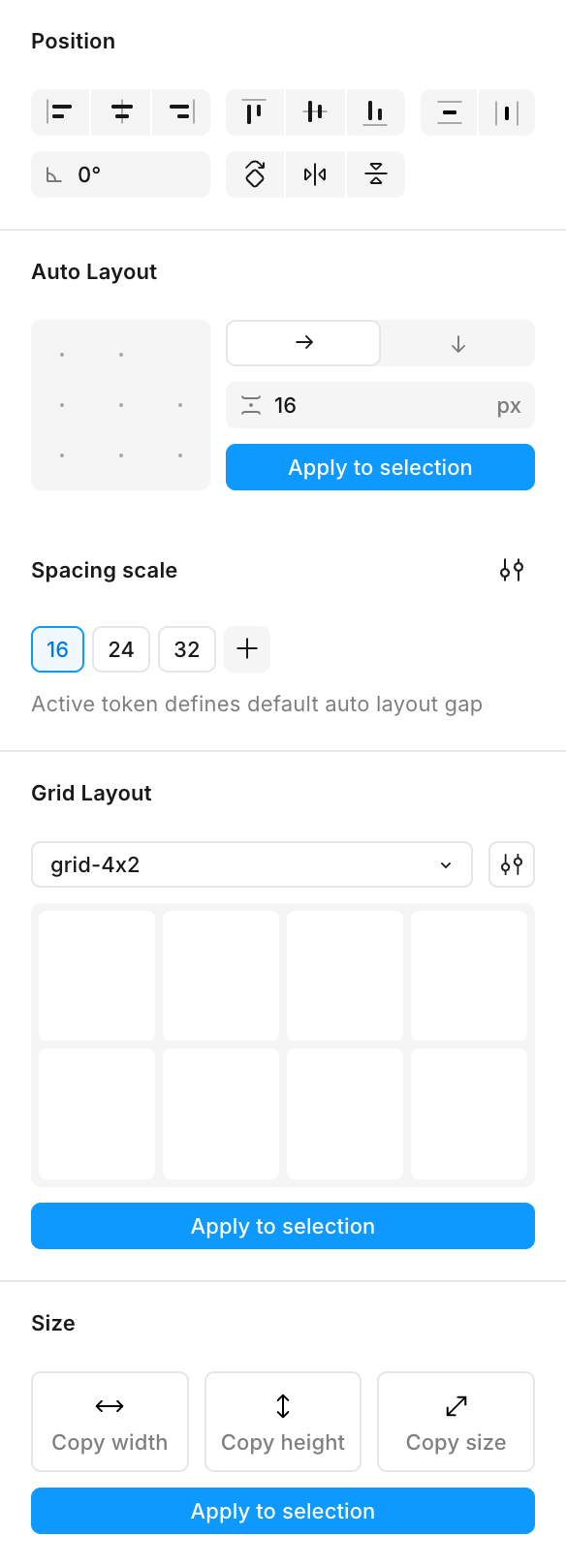
Six alignment axes plus equal horizontal and vertical distribution. Select your shapes, click once, done, referenced to the selection or the whole slide.
Pick row or column, set your gap, choose an anchor point on the 3×3 grid, and Auto Layout & Grid packs everything into a tidy stack, re-runnable any time you add or remove an item.
Grab the dimensions of one object and apply them to others: width, height, or both. Make every card, icon or thumbnail match in two clicks.
Save your spacing scale (16, 24, 32 pt by default) and reuse it everywhere. Build a real design system into your slides. Your tokens persist between sessions.
Rotate 90°, flip horizontally or vertically, or set a precise free rotation. Reorient anything without dragging handles.
Arrange your selection into a precise grid: choose columns, rows, gap and margin, then drop objects into exactly the cells you pick. Save grids as reusable presets — images keep their aspect ratio and groups scale without distortion.
Testimonials
Why didn’t I discover this tool sooner?! It should be a native feature of Google Slides. Does exactly what you ask of it.
A tool that truly makes life easier! Even after several people had edited the presentation, I was able to fix all the unwanted colors in one go. A real time-saver!
I was about to spend my whole night editing 150 slides by hand... I installed this add-on and the problem was solved in 3 minutes. Paid for itself instantly!
Thanks Tavernier Olivier! You are a life saver. Perfect tool.
Save me much time, thanks :)
Blog